Business card scanner for iPhone

Every card you're handed, in one deck.

Fandeck reads a business card in a second, right on your phone. No account, no cloud, no one else's server. Just the people you met, filed as cards you'll actually remember.

Pre-order on theApp Store Coming soon toGoogle Play

On the App Store 1 December. Pre-order now and it installs itself on the day. Android follows on Google Play.

See how it works
  • Free for your first 50 cards
  • Works offline
  • Multilingual, both sides of the card

How it works

Point. Check. It's in the deck.

Three steps, and the middle one is optional. Fandeck does the typing; you just glance.

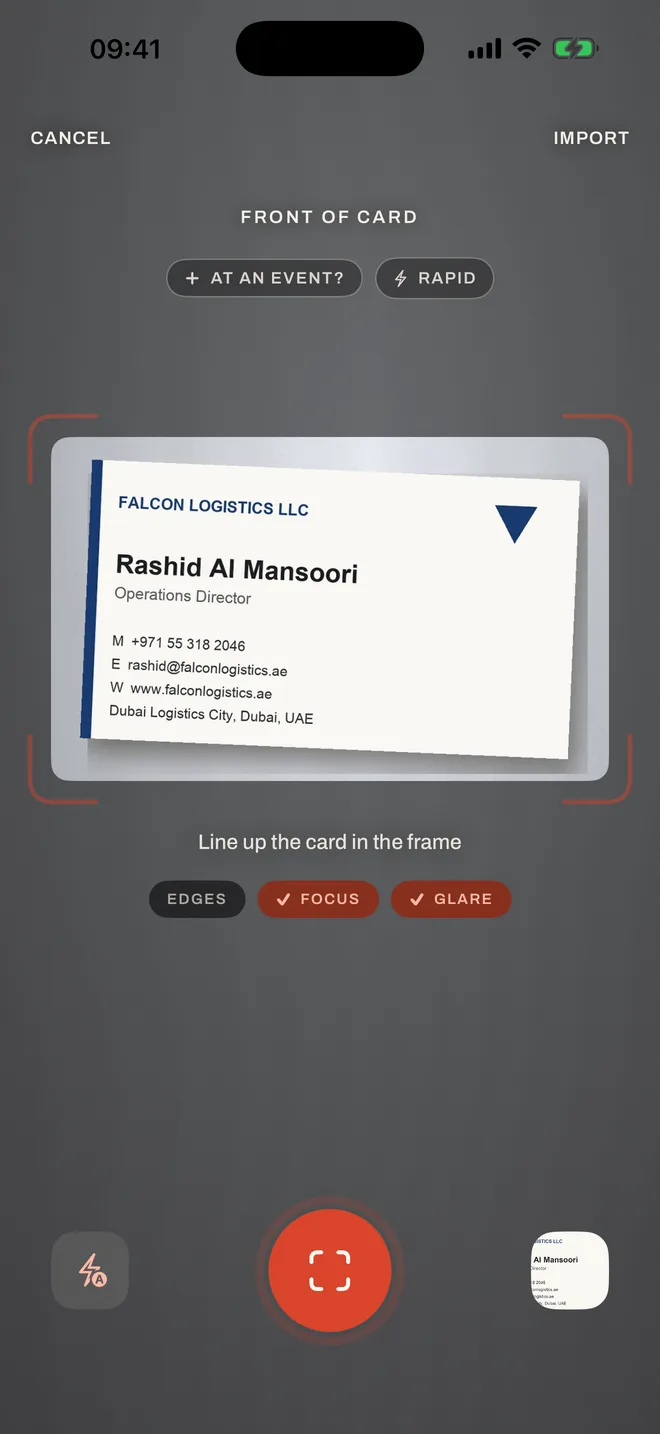
  1. The Fandeck camera lining up a business card, with edge, focus and glare checks
    01

    Hold it up

    The camera finds the edges, waits for focus, and shoots by itself. Front and back, or fronts only in Rapid mode when a pile lands on the table.

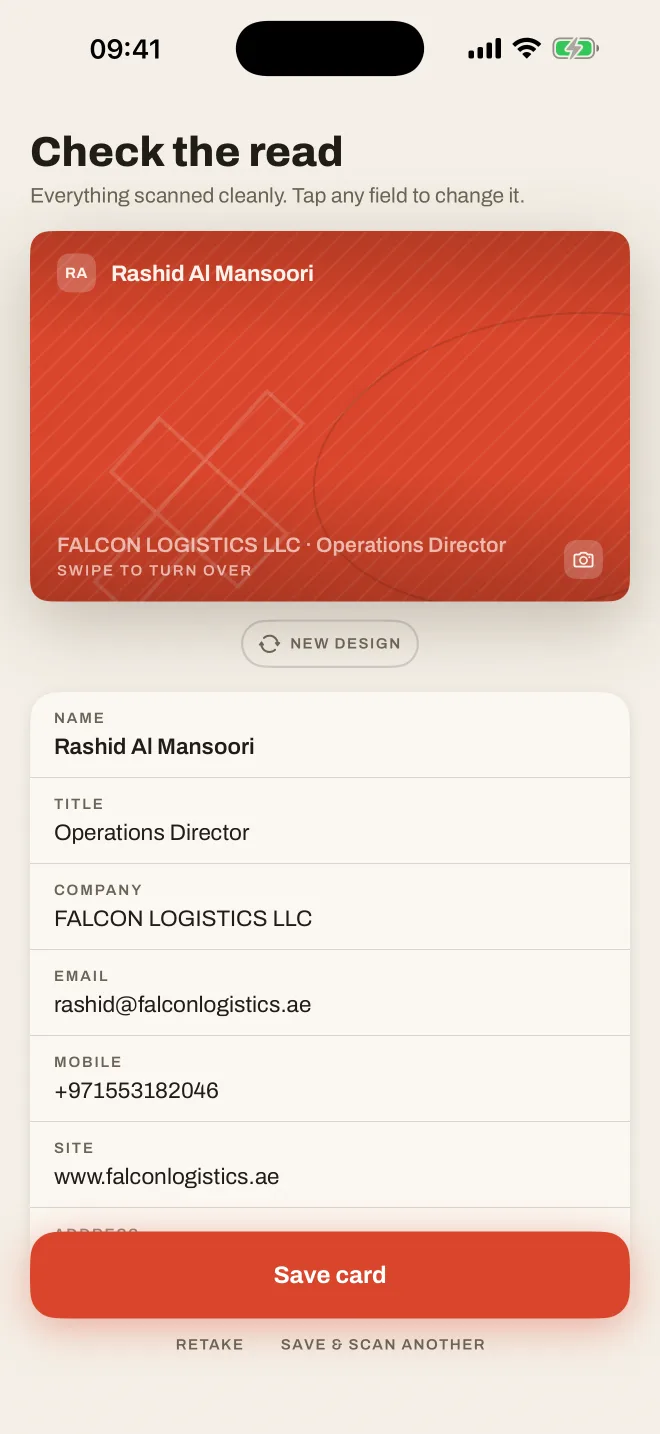
  2. The review screen showing the fields Fandeck read from the card
    02

    Glance at the read

    Name, title, company, phones, email. Anything it isn't sure about is flagged, and the photo is kept, so the printed card is always one tap away.

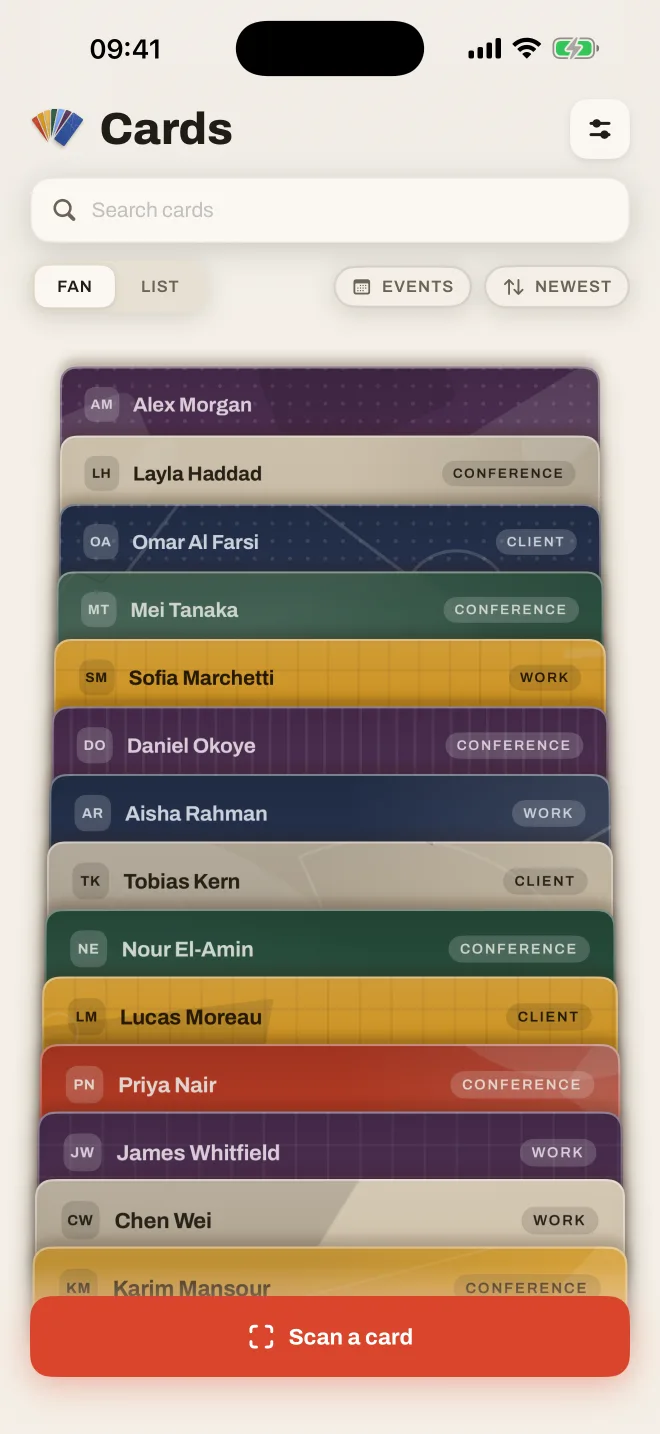
  3. The Fandeck home screen: a fanned deck of colourful contact cards
    03

    It joins your deck

    Each person becomes a card with its own colour, so a face-to-face meeting doesn't turn into row 312 of a spreadsheet. Add to Contacts in one tap.

Generative by design

Every card is an original.

Fandeck doesn't give your contacts a template. It composes a small abstract work for each one: a field of colour, a texture, and up to nine forms (circles, arcs, wedges, crosses) each set at its own size, angle and weight.

The language comes from modern art: the primary geometry of the Bauhaus, Malevich's floating Suprematist forms, the strict grids of Swiss design. Each composition belongs to its card, the same on iPhone and Android, and no two contacts share one. There are more than four billion possible designs, all drawn on your phone; nothing is downloaded.

Not keen on one? Give it a new design, as you can in the app.

YNYour name
Founder · Your Company

Tap the camera to turn over to the card itself. Fandeck keeps the photo of every card you scan, so the original is never lost and is there whenever you need it.

Privacy by architecture

Your contacts never touch our servers. We don't have any.

Most scanner apps upload every card to their cloud, then sell you access back. Fandeck reads cards with the text recognition built into your iPhone, and keeps them there.

  • 01
    No accountOpen the app and scan. No sign-up, no email, no password to lose.
  • 02
    Read on the phoneText recognition runs on-device, so it works on a plane, in a basement hall, or with roaming off.
  • 03
    Nothing collectedNo analytics, no tracking, no ads. Cards and photos are even kept out of device backups unless you export them.
  • 04
    Leaving is easyExport everything as CSV and vCard whenever you like. Your address book, not a hostage.

Made for how you actually meet people

Small touches that add up at a busy stand.

Built around trade shows, site visits and dinners, where a card changes hands in ten seconds and has to be useful a week later.

Multilingual

Every language on the card. Both sides read.

Cards printed in one language on the front and another on the back are read in full, with the side in your phone's language shown first. Latin scripts, Chinese, Japanese, Korean, Arabic and more are all read on-device, and the app itself speaks 74 languages.

Müller田中김민준الفارسي王泽成

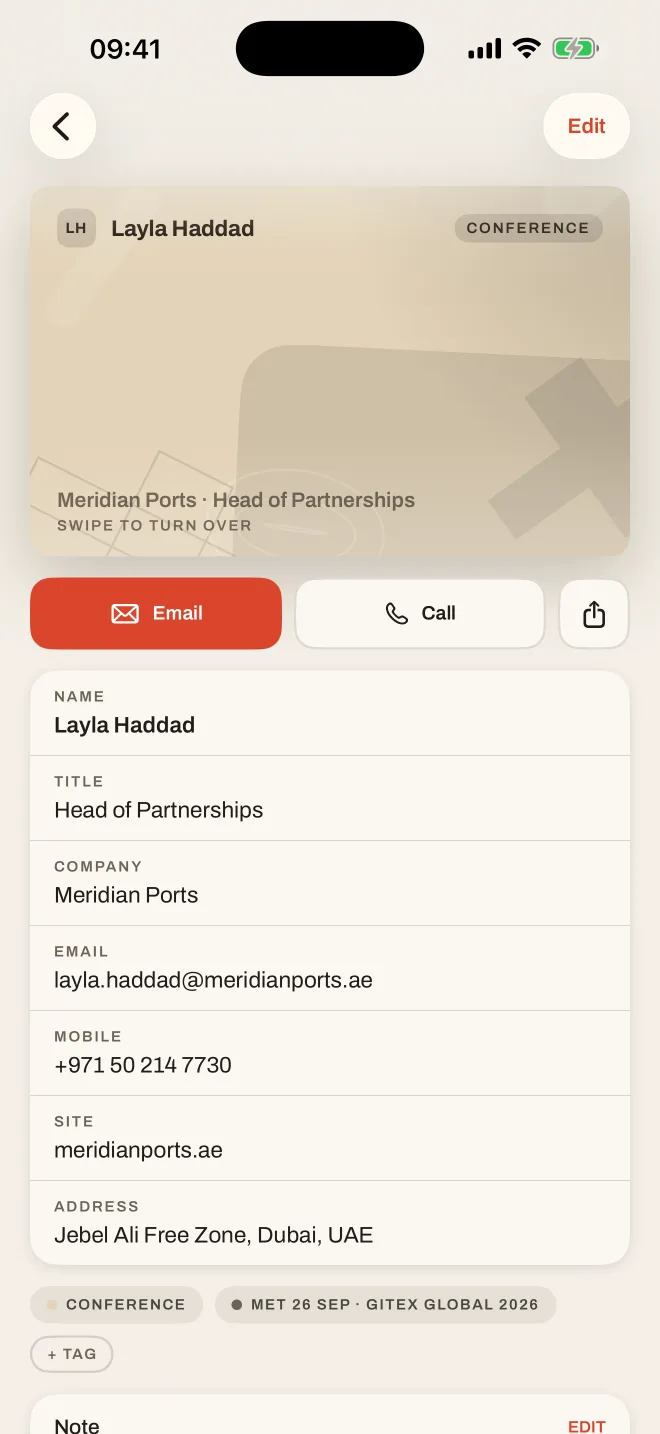
A contact card in Fandeck with email, call and share actions

Events

Tag the show once. Every card after it is filed.

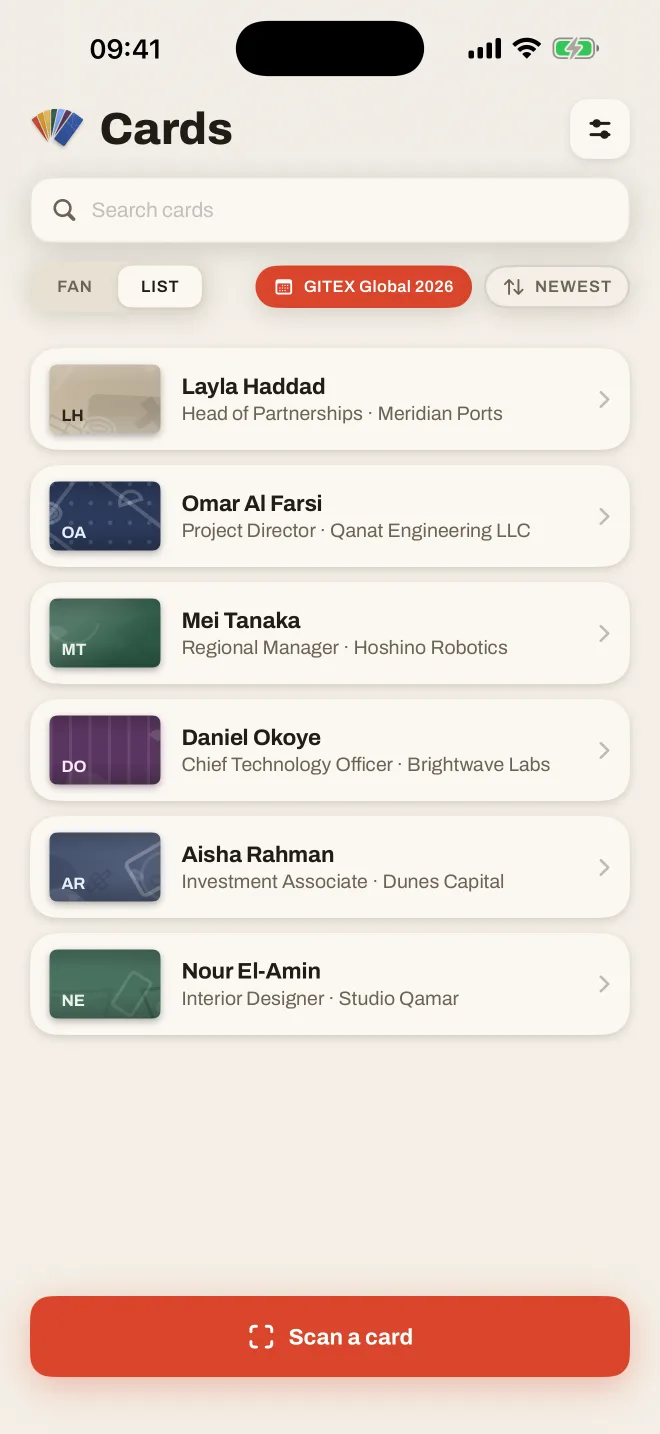
Start "GITEX Global" at the door; each scan is labelled with it until the day ends. Filter the deck by event on the flight home.

Cards filtered to the GITEX Global 2026 event

Follow-ups

A nudge before the card goes cold.

Set "tomorrow", "in three days" or "next week" from the card. A note and a voice memo keep the context of the conversation, right next to the number.

TomorrowIn 3 daysNext week

Search

Finds the card from anything on it.

A name, a company, a city, a word in your note, or text anywhere on the card itself.

Housekeeping

Duplicates merged, Contacts in sync.

Scan the same person twice and Fandeck offers to merge, keeping the best of both.

Your card, too

Hand yours over as a QR code.

Scan your own card once. Share it as a QR or a vCard when you've run out of paper ones.

Fandeck Business

Your brand. Your CRM. No middleman.

Give every rep the scanner they'd pick for themselves, with leads landing straight in the system your company already runs, including the one you built.

Most team scanners
Rep's phone→Vendor's cloud→Your CRM

Every prospect you meet is stored on a server you don't control, often with a per-seat add-on to reach your own CRM.

Fandeck Business
Rep's phone→Your CRM

One tap sends the contact from the phone to your system's URL. The same trust model as email: nothing in between.

  • Works with the system you already haveAnything that accepts a webhook: your in-house SaaS, a custom CRM endpoint, or automation tools that forward on to Salesforce, HubSpot, Zoho and the rest.
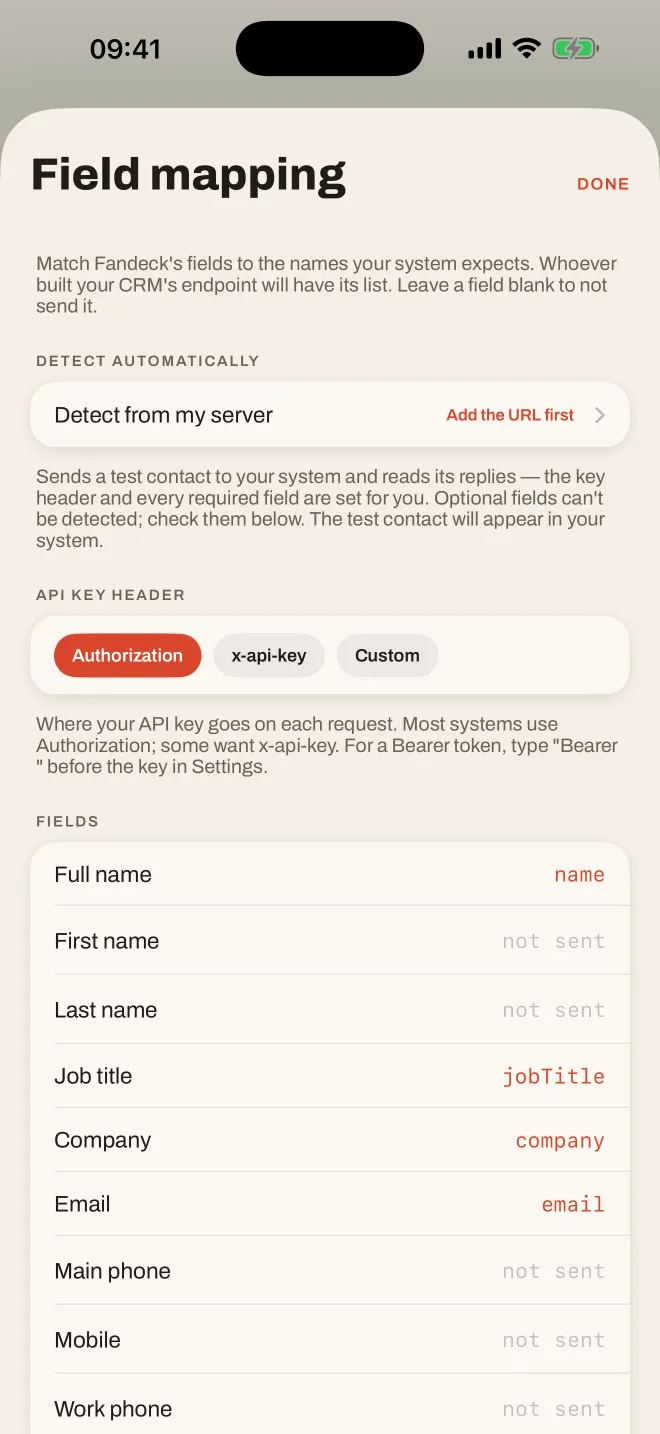
  • Field mapping, not reworkMatch Fandeck's fields to your system's names once. "Detect from my server" sends a test contact and reads back what your endpoint expects.
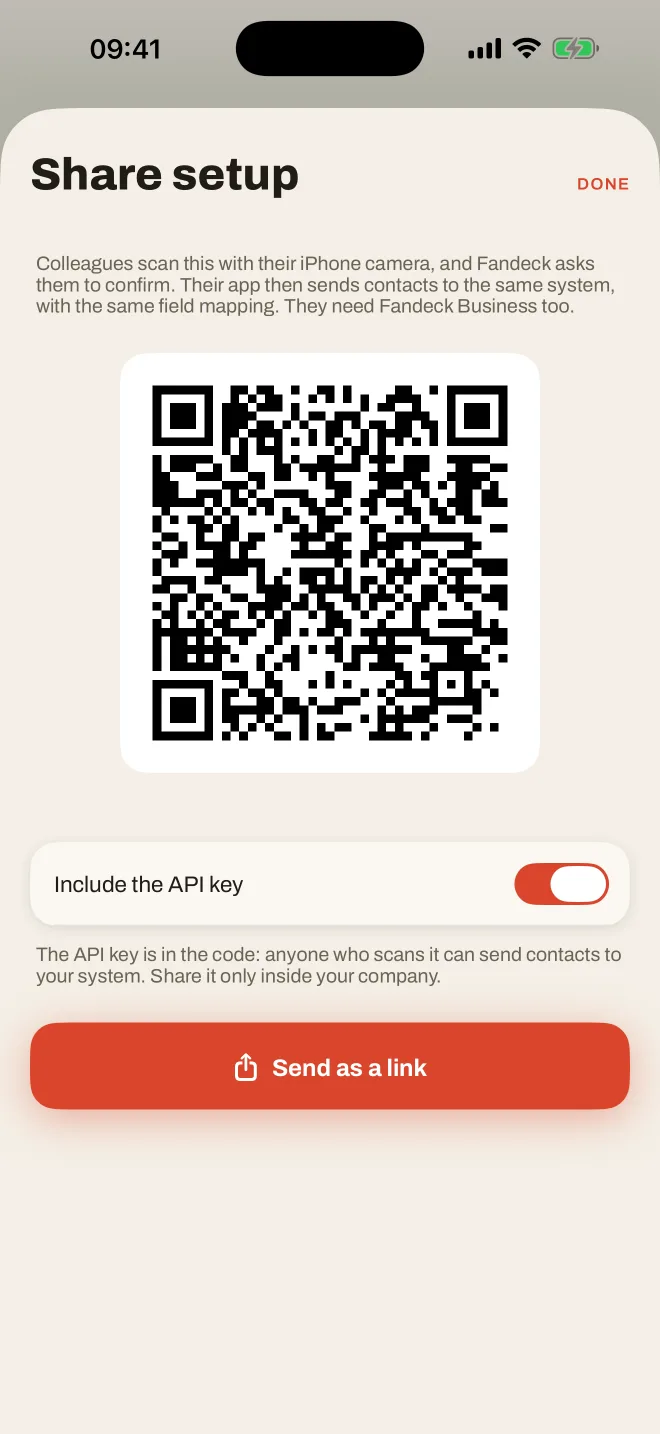
  • Set up a whole team with one QR codeConfigure one phone, show the code, and colleagues' apps pick up the same endpoint and mapping. No IT tickets, no rollout.
  • Your colour and logoEvery rep's app, from the scan button to the accents, takes on your brand colour. It feels like your tool, because it is.
Business field mapping: Fandeck fields matched to CRM field names
Share setup: a QR code colleagues scan to join the same CRM connection
Sales teams at trade showsConsultancies and agenciesDevelopers with an in-house SaaSField sales and distributors

Compare

Less than half the price. None of the cloud.

The big scanner apps have become enterprise lead-capture platforms. Fandeck stays a great scanner, at a price an individual can simply pay.

Fandeck compared with CamCard, Covve, ABBYY Business Card Reader, HiHello and Blinq
FandeckCamCardCovveABBYY BCRHiHelloBlinq
Individual, per year$19.99 (first year $9.99)$49.99$120$29.99$72about $88
Team, per user per year$59.99, CRM includedOn request$299, CRM includedNone$60, 5-seat minimumabout $60, plus a fee per enriched lead
Free to start50 cards, every feature but exportLimitedFree trial10 cards5 scans a monthDigital cards only
Account requiredNoNot statedYesNot statedYesYes
Where your contacts liveOn your iPhoneVendor cloudVendor cloudDevice, optional ABBYY cloudVendor cloudVendor cloud, enriched with outside data
CRMAny system with a webhook, straight from the phoneSalesforce, Dynamics, SugarCRM, Google, OutlookHubSpot, Salesforce, Pipedrive, Zoho, DynamicsSalesforce exportSalesforce, HubSpot, DynamicsSalesforce, HubSpot and 20+
Languages and two-sided cardsMany scripts, both sides read, your language shown firstNot stated60+ languages25 languagesNot statedNot stated
Privacy, from each company's own policy and App Store listing
Card photos sent to the company to be readNo, read on your phoneYes, not used for trainingNot statedNot statedNot statedNot stated
Adds outside data about the people you meetNeverYes, AI Business Insights (Premium)Yes, on requestNot statedYes, "Enrich" featureYes, from third-party data providers
Third-party AI services listedNoneNot statedYesNot statedYesNot stated
Analytics or advertising tools namedNoneFirebaseMixpanel, Google Analytics, Facebook, AppsFlyerAdvertising measurement, company-wideAmplitude, AdjustGoogle Analytics, Segment, Amplitude (website)
App Store label, as declared on each listing: "Data Used to Track You"NoneYes: usage dataNone declaredYes: six categories, incl. contact info and user contentNone declaredNone declared
PlatformsiPhone, Android coming sooniOS, Android, webiOS, Android, webiOSiOS, Android, webiOS, Android, web

Prices in US dollars from each company's website, checked 15 October 2026; in-app prices can differ. Privacy rows summarise each company's own privacy policy and App Store listing as of 15 October 2026. "Not stated" means we could not find it in their public pages. Policies change.

Pricing

Start free. Then monthly or yearly.

No per-scan limits on paid plans and no add-ons. Every plan includes on-device scanning, events, reminders and the full deck.

Free

$0

Your first 50 cards, for as long as you like.

  • On-device scanning, both sides
  • Events, notes, voice notes, reminders
  • Add to Contacts, duplicate finder
  • Share your own card as a QR
Pre-order free
Most popular

Pro

$19.99

per year. First year $9.99.

  • Unlimited cards
  • Export and back up as CSV and vCard
  • Everything in Free
Start with Pro

Business

$59.99

per user per year.

  • Push contacts to your own CRM
  • Field mapping and server detection
  • Team setup by QR code
  • Your brand colour and logo
  • Everything in Pro
See Business

Prices in US dollars; the App Store shows your local price. Subscriptions renew until cancelled in your Apple ID settings.

About Fandeck

We kept coming home from trade shows with a pocket full of cards, and an app that wanted an account, a subscription and our contacts.

Fandeck is made by a small, independent team based in the Gulf, where a week at an exhibition can mean two hundred cards, half of them printed in two languages.

We wanted a scanner that reads them properly, looks like something you'd choose to open, and keeps the people you meet between you and your phone. When a company wants the leads in its own system, they should go there directly, not through ours.

So there's no Fandeck server holding your data, no investor waiting for us to sell it, and no plan to change that. We make money the old-fashioned way: you pay for the app, if it's worth it.

Questions

Frequently asked.

Is anything I scan uploaded?

No. Cards are read by the text recognition built into iOS and stored only on your iPhone. Two things are optional and off by default: tagging the city where you met uses Apple's location service to name the place, and Business users can send a contact to their own CRM when they tap Push to CRM.

Do I need to create an account?

No. There's no sign-up at all. Purchases go through your Apple ID, like any app.

Which languages can it read?

Fandeck reads Latin-script languages such as English, French, German and Spanish, plus Chinese, Japanese, Korean, Arabic and more, all on-device. For a card printed in one language on the front and another on the back, it reads both sides and shows the one in your phone's language first. The app itself is available in 74 languages.

What happens after my first 50 cards?

Everything you've scanned stays yours and keeps working. To add more, choose Pro: yearly, monthly or a one-time lifetime unlock.

What if I lose or change my phone?

Fandeck deliberately keeps no copy on a server, so back up with export (CSV and vCard) from Settings. Anyone you've added to Contacts also follows your iCloud Contacts to a new phone.

Which CRMs work with Fandeck Business?

Any system that accepts a webhook, which means an HTTPS request with the contact as JSON. That covers in-house SaaS products and custom CRMs directly, and Salesforce, HubSpot, Zoho, Odoo and others through tools like Zapier, Make or n8n. Field mapping lets you match your system's field names without code changes.

Does it work without a signal?

Yes. Scanning, search, events and reminders all work offline. Only naming the city you met in needs a connection, and that's optional.

Is there an Android version?

It's on its way. Fandeck for Android is coming to Google Play after the iPhone launch, with the same design and the same privacy promise.

Can I cancel a subscription?

Any time, in Settings, then your name, then Subscriptions. If you'd rather not subscribe at all, there's a lifetime unlock for $59.99, under Other options.

Your next card deserves better than a drawer.

Free for your first 50 cards. No account, no cloud, no catch.

Pre-order on theApp Store Coming soon toGoogle Play